How to Write AI Prompts: Five Examples You Can Copy
Learn to write clear AI requests using a goal, context, constraints and an output format.


Imagine asking someone to plan your dinner. You say, “What should I eat?” They suggest a three-course seafood meal. It sounds lovely, but you have 20 minutes, a tin of beans and no desire to visit the shops.
I think of an AI prompt in much the same way. The more your request explains what you need, the less the assistant has to guess.
A prompt is the request you give an AI assistant. It can be a question, an instruction or an instruction with material for the assistant to work on.
In this guide, you’ll learn to write a clear prompt using four parts: a goal, context, constraints and an output format. You’ll see them used in five everyday examples, then use a template to write a prompt of your own.
The four parts of a useful prompt
You don’t need to label each part in every request. Thinking about them helps you decide what the assistant needs to know.
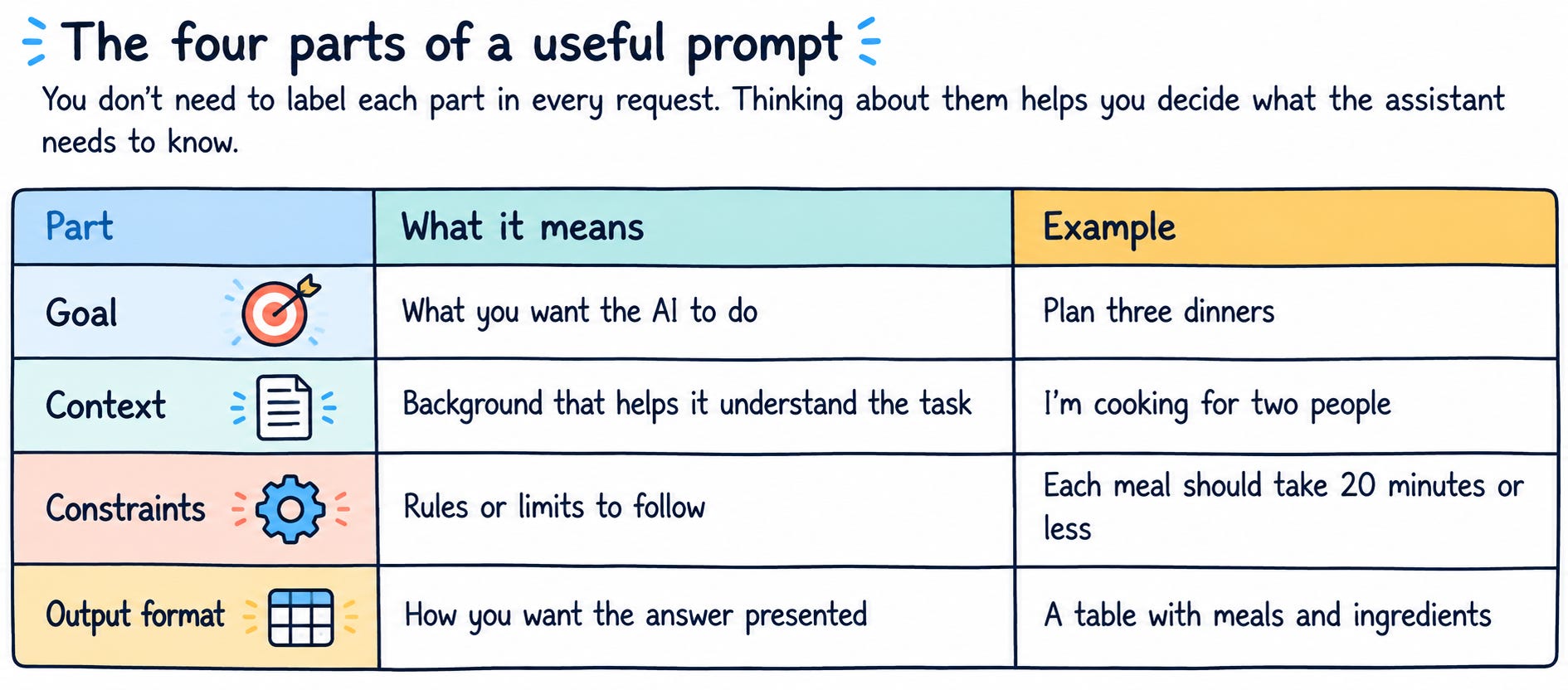
Together, those details form a clearer request:
Plan three dinners for two people. Each meal should take 20 minutes or less. Give me a table with the meal name and ingredients.
The amount of detail depends on the task. “Give me three sandwich ideas” might be enough when you only want inspiration. Add more context when the answer needs to fit a particular audience, situation or set of rules.
OpenAI’s prompting guide recommends being clear and specific, then refining your request after reviewing the response. OpenAI Help Center
Five examples: from vague request to clear prompt
Each example starts with a short request. We’ll look at what’s missing, then use the four parts to make the task clearer.
To try one, open a text-based AI chat assistant and start a conversation. Paste an improved prompt into the message box and change the details to suit your task. Account requirements depend on the service you choose.
1. Write an email
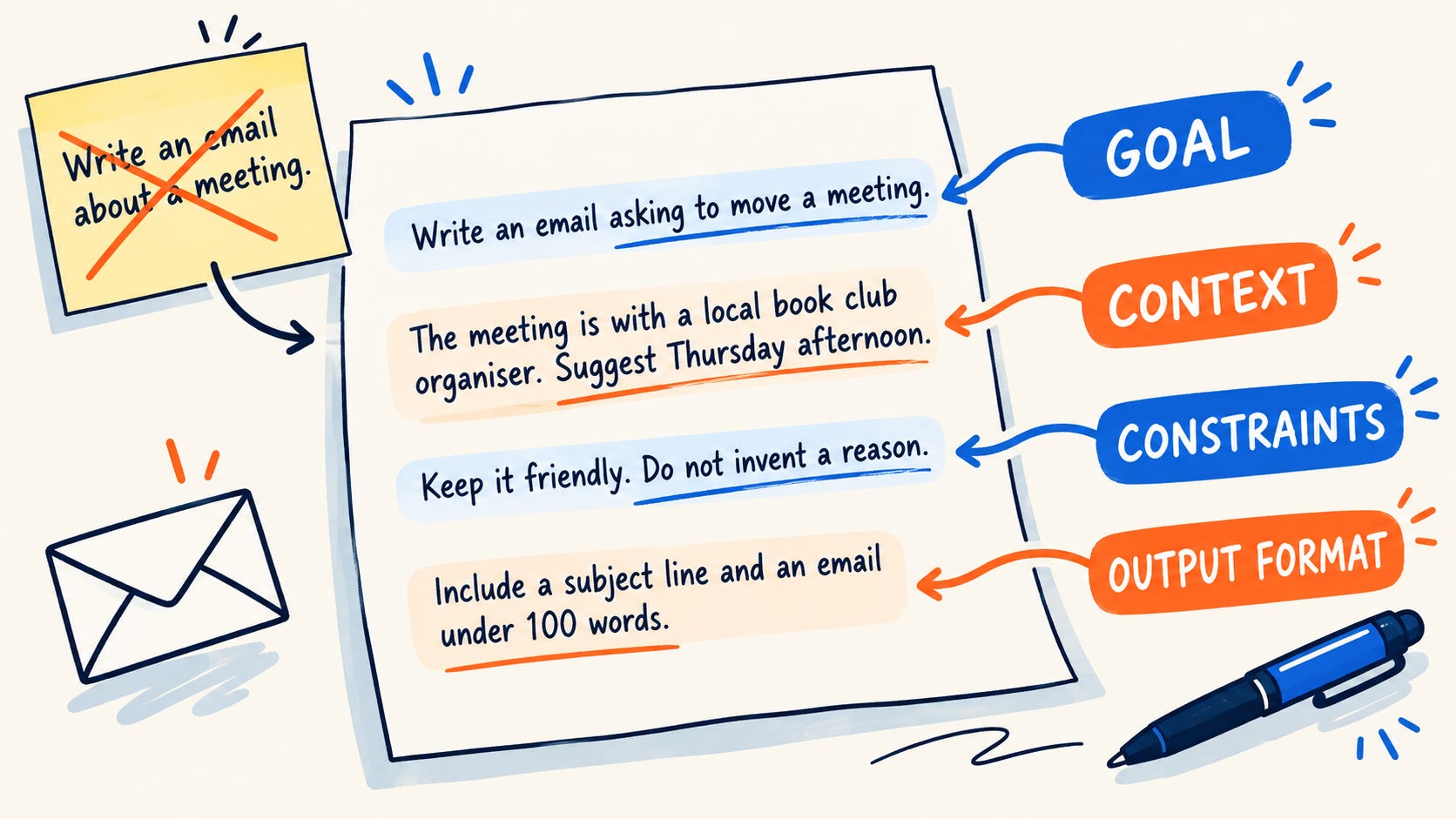
Starting request: “Write an email about a meeting.”
The goal is partly there: you want an email. The assistant still needs to know who it’s for and what you want to say.
To clarify the goal, ask for an email requesting a change. Add context about the meeting and the day you want to suggest. A constraint can set the tone and prevent an invented reason. For the output format, request a subject line and a short email.
Write an email asking to move a meeting.

The meeting is with a local book club organiser. I can no longer
attend on Tuesday and would like to suggest Thursday afternoon.

Keep the tone friendly and do not invent a reason for the change.
Write a subject line and an email of no more than 100 words.
2. Make a plan
Starting request: “Plan my week.”
That could mean a work schedule, a meal plan or a full calendar. The assistant needs to know which part of your week you want to organise.
Here, the goal is to plan three study sessions. The context explains what you’re learning and when you’re available. The constraints focus the activities on speaking and leave out written homework. A table provides an easy-to-scan format.
Help me plan three short study sessions for the coming week.

I am learning beginner Spanish and have 20 minutes available on
Monday, Wednesday and Friday.

Focus on everyday spoken phrases. Avoid written homework.
Present the plan as a table with day, activity and time.
3. Prepare for research
Starting request: “Research community gardens.”
This gives the assistant a topic, but the task is broad. You might want to investigate funding, garden design or how to find volunteers.
In this example, the goal is to develop research questions. The context explains your interest in starting a neighbourhood garden. The constraint asks the assistant not to present guesses as facts. The output format is a numbered list.
Help me prepare to research community gardens.

I am a beginner interested in how a neighbourhood might start one.

Suggest five questions I could investigate. Do not present guesses
as facts. Give me a numbered list with one sentence explaining why
each question matters.
4. Learn a concept
Starting request: “Explain percentages.”
Percentages cover a lot of ground. An explanation of percentage increases may not be where you want to begin.
A narrower goal identifies the skill: finding 10% of a number. The context describes what you already know. The constraint asks the assistant to avoid unfamiliar language, while the format requests an example followed by practice questions.
Teach me how to find 10% of a number.

I understand basic multiplication and division, but I am new
to percentages.

Use plain language and avoid assuming I know maths terminology.
Show one worked example, then give me three practice questions.
5. Edit your writing
Starting request: “Make this better.”
The assistant has no way to know whether “better” means shorter, friendlier or more formal.
Set the goal as improving a draft’s clarity. The context identifies its audience. The constraints protect your meaning and prevent added facts. The output format asks for a revised paragraph and a short explanation of the changes.
Edit the paragraph below to make it clearer for my neighbours.

Keep the friendly tone and preserve my meaning. Do not add facts.
Give me the revised paragraph, followed by a short list of changes.

Paragraph:
[Paste your paragraph here]
When you use your own writing, remove private information you don’t want to share.
Write a prompt of your own
Choose one small task you want help with. Then fill in this reusable AI prompt template:
Goal: Help me [describe the task].

Context: This is for [describe the situation or audience].

Constraints: Please [add any rules or limits].

Output: Present the answer as [describe the format].
For example, you might ask for a packing list for a weekend trip, add the destination and planned activities, set a limit on luggage, and request a checklist.
Once you’ve filled in the template, paste it into your AI assistant and send it. The labels help you organise your thoughts, though you can also write the same instructions as a natural paragraph.
Help keep useful AI advice free.
My name is Phillip Alcock, and I am an educator turned AI workflow creator.
I started AI for Beginners to give you clear explanations, practical examples and honest guidance without the hype.
Subscribe free for new posts. If my work helps you, consider becoming a paid supporter. Your support gives me more time to test tools, create tutorials and keep these articles free for everyone.
Become a supporter for just $5/month or $50/year and help keep AI for Beginners free for everyone!
Each subscription allows me to create a new article!
For educators: Find AI workflows and courses at my education blog and find out more about my education project PBL Future Labs here.
Feel free to e-mail me at phil@pblfuturelabs.com if you would like any AI platform coaching!
Phil
Discussion about this post